Use Notepad in Codify to Create a Code List
- By Deborah Marsh
- In Coding
- August 1, 2023
- Comments Off on Use Notepad in Codify to Create a Code List

Collect and export a code list to work on a specific task.
The Notepad feature in Codify by AAPC allows you to collect codes for a specific task without affecting your Favorite Codes list. Adding, accessing, and exporting the codes is simple.
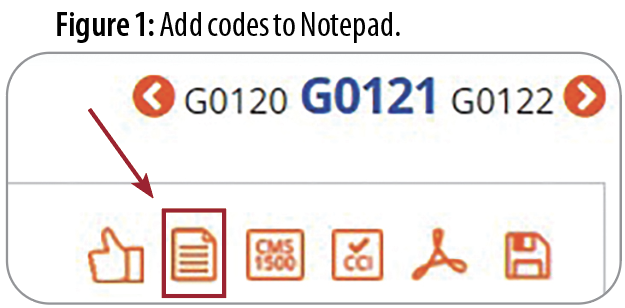
Step 1: In the code lookup tool, open a CPT® code details page by entering the code in the search box. On the top right of the code details page, click the page icon to add the code to your Notepad (Figure 1).
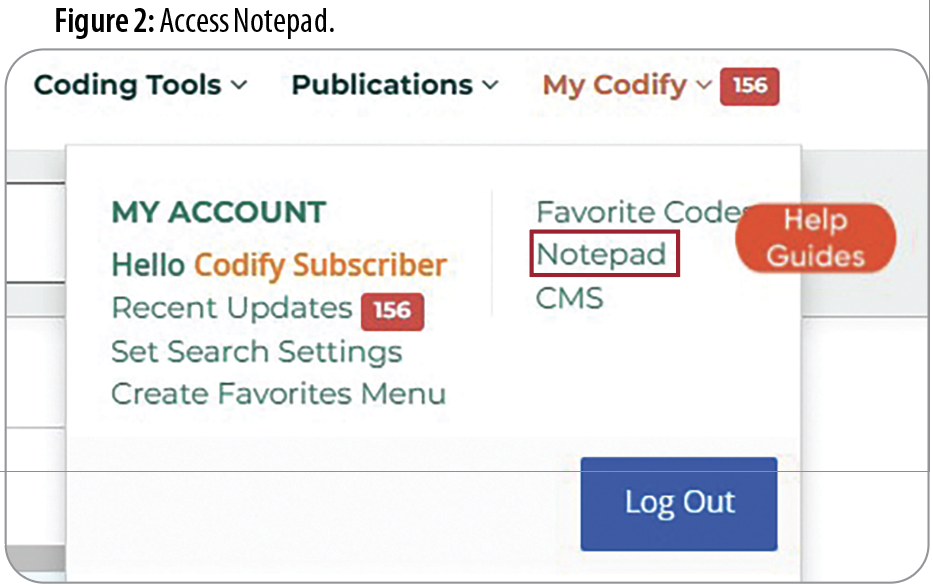
Step 2: In the top menu, select My Codify>Notepad (Figure 2).
Step 3: Select the code set you want to view. For certain code sets, you can select whether you want to see facility or nonfacility Medicare Physician Fee Schedule (MPFS) data, if it’s available with your Codify package. In the left column, check the codes you want to export. Click Export Selected to download a file of the codes, including descriptors and MPFS data, if applicable (Figure 3).


- Access Your Favorite Articles in Codify - February 2, 2026
- Codify Bonus: A Vast Library of Content to Expand Your Knowledge - December 1, 2025
- Search Faster With Smart Search - October 1, 2025