Navigate Your eBook Like a Pro
- By Lisa Meaney
- In Coding
- January 2, 2024
- 1 Comment

Make the most of the Table of Contents in your electronic code books.
New eBook users will benefit from the Table of Contents, as it provides a virtual “road map” of the entire eBook. When you open any book in VitalSource’s Bookshelf, the default setting shows an interactive Table of Contents on the left and the eBook contents on the right. If the table of contents is hidden, simply click on the three lines in the upper-left corner.
In the Table of Contents, click on a section to instantly go to the first page of that section in the eBook (see Figure 1).

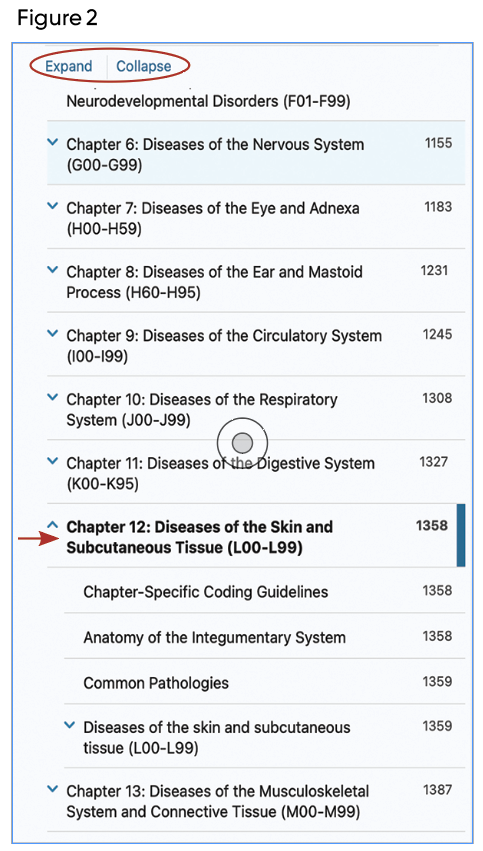
If you want to go to a specific subsection, click on the arrow to the left of the section title in the Table of Contents to display the subsections within (see Figure 2). You can also click Expand or Collapse to show or hide all the subsections in the Table of Contents.
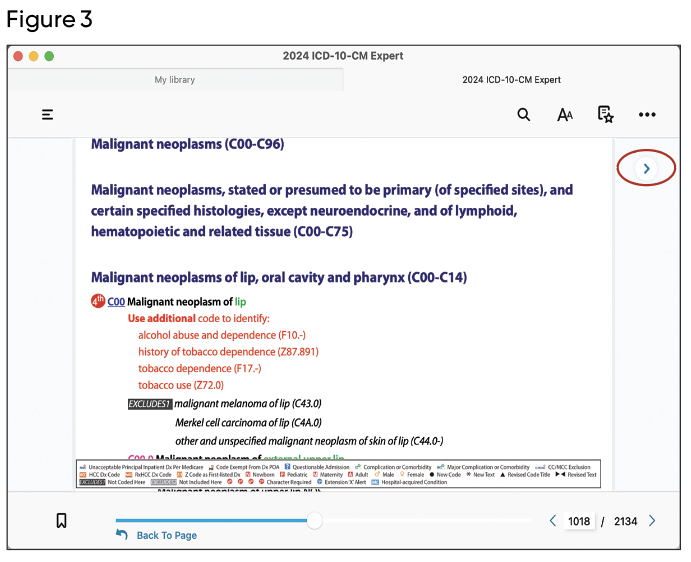
Once you get to where you want to go in the eBook, you can hide the Table of Contents to create a larger book-viewing area. Simply click on the three lines in the upper-left corner to close the Table of Contents or use the Open/Close Margin arrow in the upper-right corner to expand the eBook contents to fill the screen (see Figure 3).
Use the Table of Contents to view everything included in your eBook at a glance and navigate its contents like a pro!

- Using Your eBook for Exam Prep - January 2, 2025
- Use Your HCPCS Level II Code Book Like a Pro - December 2, 2024
- Work Smarter, Not Harder in eBooks - November 1, 2024


Hello,
I’ve been using the eBooks more as I feel that’s the future of books. I’d much rather use the eBooks. However there is still some improvement needed to truly be a great tool for coders.
With the AAPC ICD-10-CM book, (and with the AMA CPT), when you do a search, you cannot:
1. collapse all results categories at once. Some searches render hundreds of results. One has to scroll through to find what you’re looking for. This wastes time.
2. If you’re seaching for a category- the category isn’t the first listed entry under the Alphabetic Index. Its not even the first entry under the proper alphabetic letter for that category. Again, one needs to scroll throuhg evening to get to the proper letter, to then scroll more to find the category (its the entry that the first letter is capitalized).
3. Can’t really narrow down a search that I’m finding. Ex- if you type in search Diabetes Mellitus Type 2, I don’t get any results for the Alphabetic Index to be able to go directly there to scroll any sub categories. Instead I get resuls for the official guidelines, the chapter specific coding guidelines, and to entries in Endocrine & Metabolic section, then to Type 2 Diabetes Mellitus- (even reversing it to diabetes mellitus type 2 renders the same way with no alphabetic index entries), with having to go straight to the tabular index, again one has to scroll through to try to find what they’re looking for if its not the simple coding of DM2.
4. In the Alphabetic Index, also here you can’t collapse all and open categories and subctegories as you might want to. It would allow for faster searching. And could help with knowing what category you’re under when you arrive to an alphabetic index page from a search result. You often open up into the middle of a category, not knowing what indent you’re in. It would be helpful if either the main category then the subcategories ‘stuck’ to the top of the page, or at minimum when one hovered over the indent lines it gave you more information than 1st indent, 2nd indent, etc.
The eBooks are nicer to use, but a bit frustrating. I can appreciate that the coding books contain a ton of information and codes, making it hard to manage that information. However, some of my points are basic UI to make usage of the books easier and faster. And seeing productivity is a big factor for the job, I would think this would be a high priority for eBooks to provide.
Just my two cents. If you have any information/tips as to how to better narrow down searches, or if I’m missing something with the set up of the VitalSource Bookshelf App and website reader, I’d love to learn more as I’ve not found information to help with the issues I’ve outlined. Thank you!