Tips for Using VitalSource eBooks
- By Lisa Meaney
- In AAPC News
- March 1, 2024
- Comments Off on Tips for Using VitalSource eBooks

Use these electronic code book features for optimal navigation.
There are many ways to quickly traverse your eBooks in VitalSource. Let’s review some of the most useful navigation tools.
Find and Seek
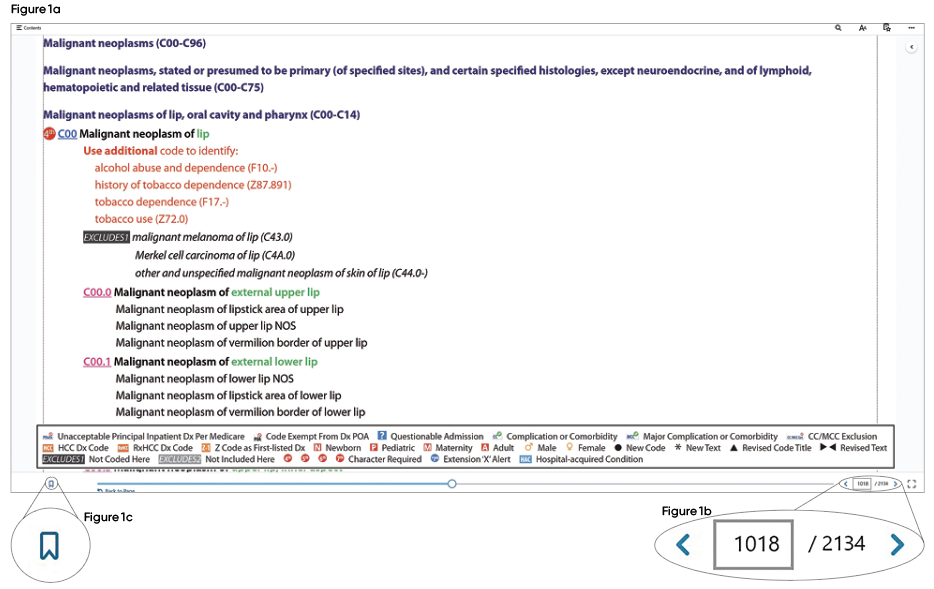
The seek bar at the bottom of the book lets you quickly slide to any position in the book, or you can simply type in a specific page number to jump to an exact location.
You can also use the right and left arrows in the bottom-right corner of your eBook to instantly jump from section to section (see Figure 1a).
Mark Your Place If, at any time, you want to mark your place within the book, click on the bookmark button at the bottom-left corner and a bookmark will be added for that specific page (see Figure 1b). You will find all your bookmarked pages saved under the Workbook button (see Figure 1c).

Lisa Meaney, BS, RHIT, CPC, CEDC, has worked in the health information technology field for the past 14 years. Her areas of expertise include emergency department coding, E/M level assignments, and infusion and injection coding. She currently serves as a senior development editor for AAPC. Prior to joining AAPC, Meaney worked as a senior content editor at The Coding Institute, preparing and editing content for a variety of instructional resources and official code books.
Latest posts by Lisa Meaney (see all)
- Using Your eBook for Exam Prep - January 2, 2025
- Use Your HCPCS Level II Code Book Like a Pro - December 2, 2024
- Work Smarter, Not Harder in eBooks - November 1, 2024