Tips for Setting eBook Preferences
- By Lisa Meaney
- In AAPC News
- May 1, 2024
- Comments Off on Tips for Setting eBook Preferences

Explore the tools that let you customize the look of your eBook.
In the April issue of the magazine, you learned how to quickly navigate your coding eBooks. In this article, you’ll learn how to easily set your eBook viewing options to your personal preferences to make these AAPC resources even more invaluable.
Choose Your Display Settings
Begin by opening your eBook and then clicking on the Reader Preferences icon in the upper right-hand corner (Figure 1). In the resulting Reader Preferences dialog box (Figure 2) you can change the text size, font style, background color mode, margin widths, and even the line spacing (on certain pages) on the Display tab. The default is Normal text size, a sans serif font, in Day mode, with small margins, and single line spacing.

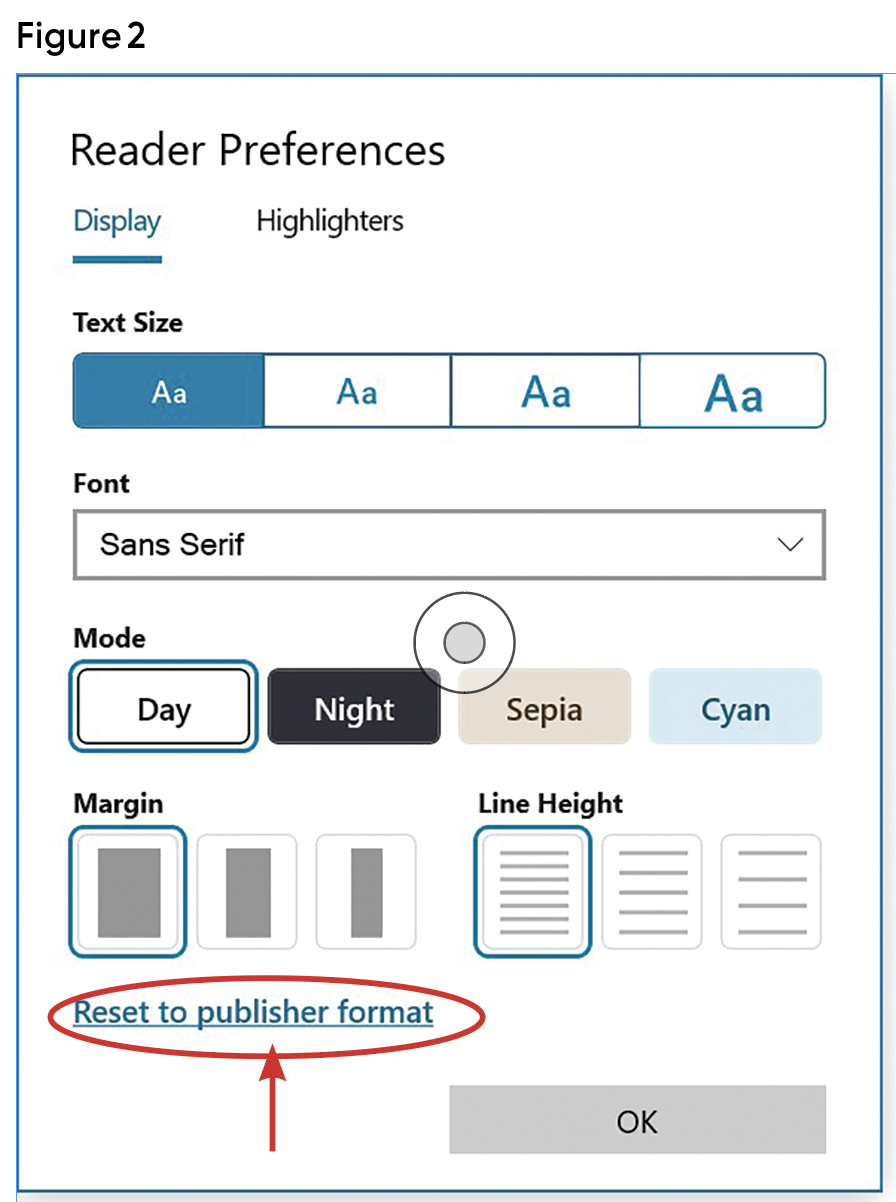
Play around with the different settings until you find the settings that will help you work most effectively. If at any time you regret the changes you made, simply click the “Reset to publisher format” option in the Reader Preferences tab.
Note: The Reader Preferences tab is also where the highlighter controls are, but we’ll save that for another time.

- Using Your eBook for Exam Prep - January 2, 2025
- Use Your HCPCS Level II Code Book Like a Pro - December 2, 2024
- Work Smarter, Not Harder in eBooks - November 1, 2024