Highlighting and Notating in Your eBooks
- By Lisa Meaney
- In Healthcare Business Monthly
- July 1, 2024
- Comments Off on Highlighting and Notating in Your eBooks

Customize your electronic code books to remember important information on the fly.
VitalSource Bookshelf allows you to highlight text and take notes in your AAPC eBooks for easy recall. This is a necessity for medical coders who have production and quality standards to meet. Plus, it makes your job easier!
Highlighting Text
To highlight text in your eBook, double click any word (or click and drag across any amount of text) on the page. From the resulting pop-up menu, select the desired highlighter color (see Figure 1).
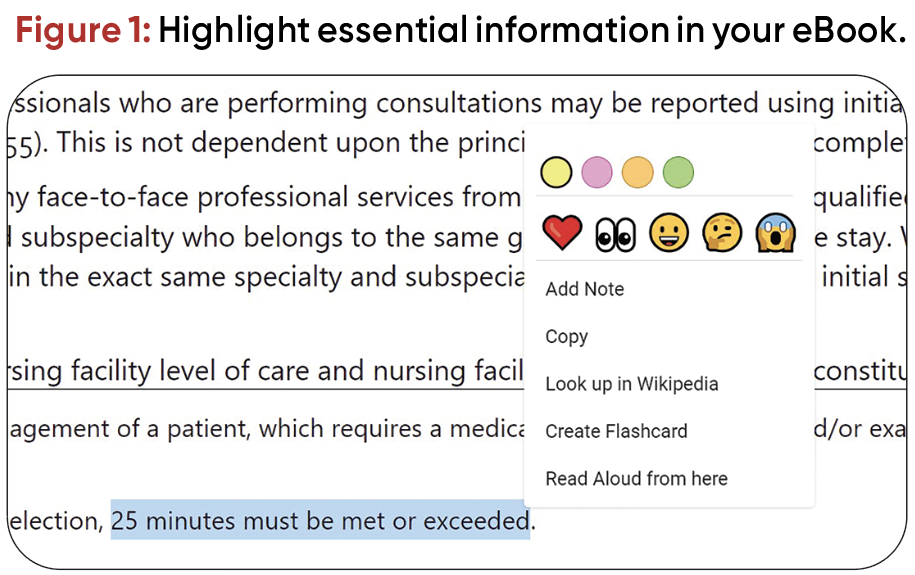
To change or delete the highlighter, simply click on the highlighted text and select a different color or the circle with an X from the resulting pop-up menu.
After you finish highlighting your eBook, you’ll appreciate the Workbook panel, where you can see all of your highlighted text throughout your eBook (see Figure 2). To access it, click the Workbook icon on the menu bar. From there, you can click on a highlighter to see all the text highlighted with that color and then click on a line item to go directly to that entry in your book.

Taking Notes
Taking notes in your eBook is just as easy. Simply double-click or select the text to which you want to add a note and, in the same pop-up menu in which you apply highlighter colors, select Add Note. Bookshelf automatically highlights the selected text and opens a notes text box in which you can type your note. Click the checkmark to save the note. An icon indicating that you made a note will always show to the right of the page, even if your eBook is expanded (see Figure 3).
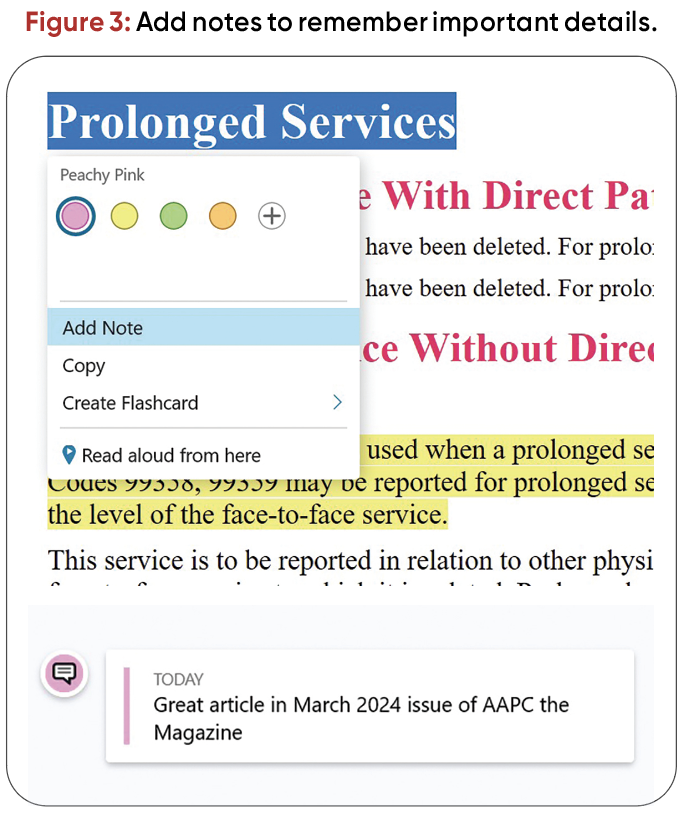
You can edit or delete any of your notes by clicking on them in the right margin or via the Workbook.
Note: Features may vary depending on the version of Bookshelf you have. For example, the emojis that display in the pop-up menu in this example are currently only available in the beta version.

- Using Your eBook for Exam Prep - January 2, 2025
- Use Your HCPCS Level II Code Book Like a Pro - December 2, 2024
- Work Smarter, Not Harder in eBooks - November 1, 2024