Using Your eBook for Exam Prep
- By Lisa Meaney
- In Career Growth
- January 2, 2025
- Comments Off on Using Your eBook for Exam Prep

Quiz yourself by creating digital flashcards that provide feedback on your knowledge.
Create Flashcard is a useful feature built into your eBooks that comes in handy when studying for an AAPC certification exam or reviewing difficult coding concepts.
Create a New Deck
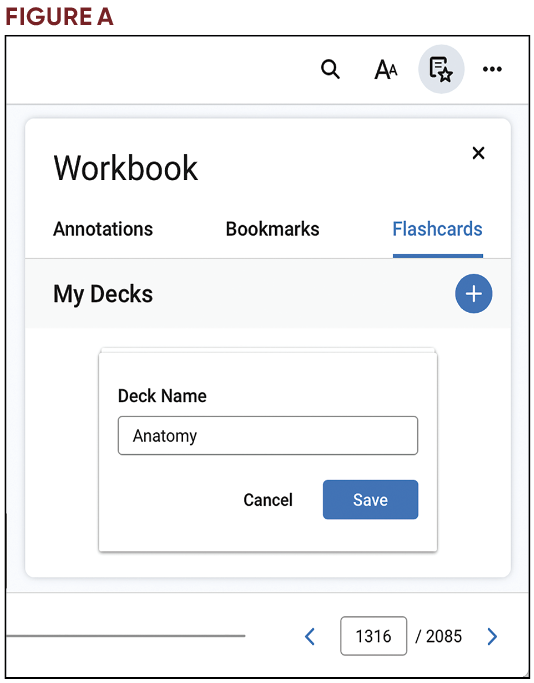
To use this feature, start by creating a new flashcard deck, as shown in Figure A:
1. With your eBook open in Bookshelf, click the Highlights, Notes, Bookmarks & Flashcards icon in the upper-right corner of the task bar.
2. In the Workbook panel that is now open, go to the Flashcards tab.
3. Click the plus sign to the right of My Decks to create a new deck.
4. Enter a name for the new deck and click Save.
You can have as many decks and as many flashcards within a deck as you wish, and you can add and delete flashcards from a deck at any time.
Create a Flashcard
Now, double click or highlight any word, phrase, or image within the eBook that you would like to add as a flashcard in the new deck. In the resulting pop-up window, select Create Flashcard and then choose the deck from the resulting pop-up menu, as shown in Figure B.

This action automatically creates a new flashcard in the Workbook panel, and the information you selected is populated in the front of the flashcard. Edit this text, if need be, and then type whatever text you wish on the back of the flashcard. Click Save when you’re done.
Time to Study!
After you’ve added at least one flashcard to a deck, you can click Study in the Workbook panel to open a deck in full screen, as shown in Figure C. Click the arrow in the top-right corner to see the flipside of a flashcard. Click the arrow on the side of the deck to cycle through the cards. Keep track of how you’re doing by using the “I Don’t Know It” and “I Know It” buttons.


- Using Your eBook for Exam Prep - January 2, 2025
- Use Your HCPCS Level II Code Book Like a Pro - December 2, 2024
- Work Smarter, Not Harder in eBooks - November 1, 2024


