Now on Codify by AAPC: Share favorite articles and codes within your organization
Published on Tue Jan 20, 2026
If you access Codify by AAPC by AAPC on a business license and you’re part of an organization, you can now use two new sharing options to help your team collaborate and work more efficiently.
Shared articles: Your teams can share important reference articles to reduce duplicate research and apply the same guidance.
- Go to My Codify by AAPC (top menu)/Favorite Articles.
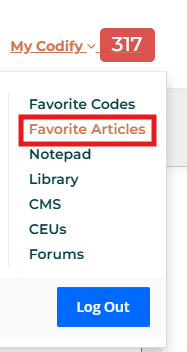
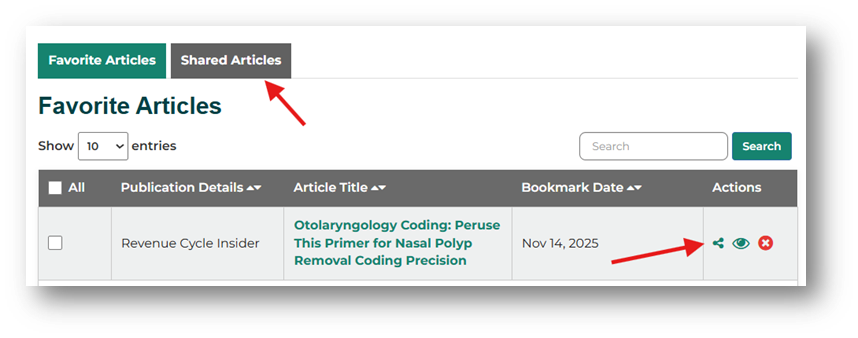
- Find an article you’ve already favorited. If eligible, you’ll see a share icon next to the article.
- Click the share icon to make the article available across your organization.
- To view shared items, select the Shared Articles tab.
Share codes: Your teams also can share commonly used codes to improve reporting consistency and workflow.
- Go to My Codify by AAPC/Favorite Codes.
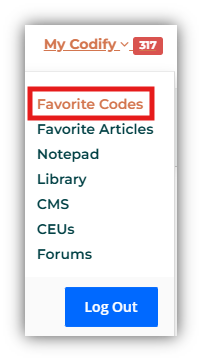
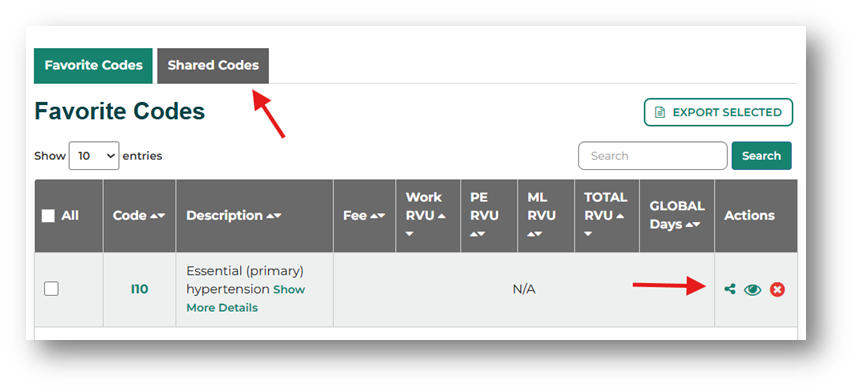
- In your Favorite Codes dashboard, find a code you’ve already favorited. If eligible, you’ll see a share icon next to the code.
- Click the share icon next to the code to add it to your organization’s shared favorites.
- To view shared items, select the Shared Codes tab.
Note: Tools and data available may vary based on your Codify by AAPC package. These sharing features do not apply to individual subscriptions and are available only to users on a Codify by AAPC business license who are part of an organization.